
CallRail Softphone Dialing is CallRail’s browser-based calling feature that lets users place and receive business calls directly from the CallRail app without a desk phone or separate dialing device. It connects call tracking, caller details, recording, and reporting in one interface, so teams can manage conversations faster and log activity accurately.
This feature supports sales and support workflows by reducing manual dialing steps and keeping call data tied to each lead or customer record. It improves visibility with call routing, conversation tracking, and real-time access to call analytics. For businesses using marketing attribution and lead management, CallRail Softphone Dialing provides a direct way to handle inbound and outbound calls while preserving reporting accuracy and team efficiency.
Why Use CallRail? CallRail Softphone Dialing

CallRail is a detailed call tracking and analytics system that enables businesses to monitor and evaluate phone calls and web form entries. It helps companies to comprehend which marketing campaigns drive calls, track customer interactions, and gather beneficial information to improve general performance.
CallRail integrates flawlessly with various marketing tools and systems, giving an overall sight of your marketing efforts.
Who Should Use CallRail?

Marketing Agencies
Marketing agencies frequently battle to show the ROI of their campaigns, particularly when it concerns offline conversions like call. CallRail supplies in-depth call tracking and acknowledgment, making it possible for companies to show their clients exactly which campaigns are driving telephone call.
This openness helps companies justify their approaches, maintain clients, and win new business by showing clear, data-driven results.
Small and Medium-Sized Businesses
For SMBs, every lead is crucial. CallRail helps these businesses track the source of their telephone call, whether they originate from online ads, natural searches, or offline marketing initiatives. By understanding which channels are most reliable, SMBs can allocate their marketing budget plans more successfully and concentrate on the methods that generate one of the most leads.
The call recording and analytics features enable businesses to enhance their customer support and sales processes.
Enterprises
Huge enterprises commonly have intricate marketing methods that extend multiple networks and campaigns. CallRail incorporates flawlessly with existing CRM and marketing tools, supplying ventures with a detailed view of their marketing performance.
The platform’s innovative analytics and lead racking up features help ventures manage high volumes of calls and focus on leads, making sure that their sales teams concentrate on one of the most encouraging possibilities.
Ecommerce and Retail
While e-commerce and retail businesses largely operate online, call remain an essential touchpoint for customer support and sales inquiries. CallRail assists these businesses track calls created from their online marketing initiatives, such as PPC advertisements and email campaigns.
By recognizing which marketing activities drive one of the most calls, e-commerce, and retail businesses can maximize their approaches to enhance customer involvement and drive sales.
Best Characteristics CallRail Softphone Dialing
Call Tracking
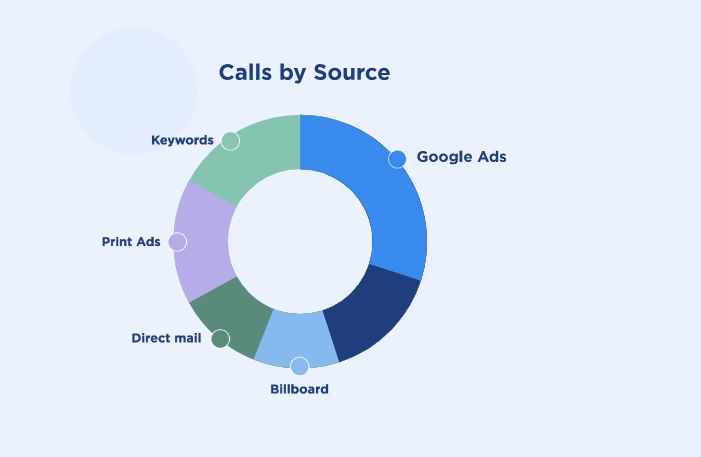
Call tracking is the cornerstone of CallRail’s capability. This function allows businesses to assign special phone numbers to various marketing campaigns and networks. By doing so, businesses can exactly track which campaigns are creating phone calls.
For example, you can make use of different numbers for your Google Ads, Facebook ads, email campaigns, and direct mailers.
CallRail’s call tracking provides insights into call resources, durations, and end results, allowing you to connect call to details marketing initiatives and make educated decisions about where to assign your budget plan.
Call Recording
Call recording is an essential tool for quality control, training, and acquiring insights into customer interactions. CallRail records all inbound and outbound calls, enabling you to evaluate them later.
This function assists businesses guarantee that their staff are giving superb customer care, adhering to manuscripts, and taking care of calls successfully.
It additionally permits you to determine usual customer concerns and issues, giving important info for refining your marketing messages and boosting your products or services.
Dynamic Number Insertion
Dynamic Number Insertion is a powerful feature that automatically presents different contact number on your website based on the site visitor’s resource or actions. For example, a visitor coming from a Google Ad may see a different contact number than a person showing up from an email project.
DNI aids you track online sources of phone calls accurately, giving you in-depth attribution information. This feature makes sure that you understand exactly which online campaigns are driving telephone call, allowing for far better optimization and coverage.
Lead Scoring
Lead rating aids businesses prioritize incoming leads based on their potential worth. CallRail’s lead scoring feature assesses calls and designates scores based on predefined criteria, such as call period, search phrases discussed, and customer interaction.
High-scoring leads are likely to be more appealing, permitting your sales team to focus their initiatives on shutting these chances. This attribute improves the lead monitoring process and improves sales performance by directing attention to one of the most valuable potential customers.
Call Statistics CallRail Softphone Dialing
Call analytics supplies a detailed view of your call data, using thorough reports available volume, call duration, call resource, and more. CallRail’s analytics control panel is user-friendly and personalized, allowing you to produce records that are tailored to your details needs.
These insights aid you understand the efficiency of your marketing campaigns, identify patterns, and make data-driven decisions to maximize your methods. The capacity to dive deep into call information guarantees that you are constantly boosting your marketing and sales initiatives.
Keyword Spotting
Keyword spotting is an innovative function that instantly discovers and highlights details search phrases mentioned during calls. This function enables businesses to keep track of require crucial expressions connected to products, solutions, or customer problems.
By identifying search phrases, you can obtain insights into customer rate of interests, issues, and responses. Key words identifying aids you fine-tune your marketing messages, improve customer care, and ensure that your sales team is addressing the best subjects throughout calls.
Combinations
CallRail integrates effortlessly with a large range of marketing and CRM tools, including Google Analytics, Salesforce, HubSpot, and more. These assimilations permit a seamless circulation of data between CallRail and your existing systems, making sure that all call data is synchronized and accessible throughout platforms.
Integrations improve the functionality of CallRail by combining call tracking information with other marketing and sales information, supplying an all natural sight of your customer interactions and campaign performance.
Getting Started With CallRail

Sign Up and Set Up
To start, check out CallRail’s website and register for an account. You can start with a free trial to check out the platform’s features. Fill in your business details, including your name, business name, email address, and telephone number.
As soon as you’ve created an account, you’ll be led through the preliminary setup procedure. Configure your business setups, such as time zone, firm hours, and call transmitting preferences.
Install Tracking Numbers
In your CallRail control panel, browse to the “Numbers” area and click “Develop Number” to create brand-new tracking numbers. You can select neighborhood or toll-free numbers based on your demands. Designate each tracking number to a certain marketing project or channel.
For example, you might designate one number to your Google Ads campaign, one more to your Facebook ads, and a third to your website. Provide a name and summary for each tracking number to conveniently recognize them later.
Integrate with Various Other Tools
CallRail connects with numerous CRM and marketing platforms like Google Analytics, Salesforce, and HubSpot. Go to the “Combinations” area in your CallRail control panel and select the tools you use. Comply with the triggers to verify and link each tool.
This makes sure that call information flows perfectly between CallRail and your existing systems. Customize notifications to obtain alerts for certain call activities, such as missed calls or high-scoring leads.
Go to the “Alerts” area, produce brand-new notifications, and set the criteria for triggering informs. CallRail Softphone Dialing
Display and Analyze Calls
Your CallRail control panel offers an introduction of call activity, consisting of complete calls, answered calls, missed calls, and call sources. Tailor your control panel to present the metrics that matter most to your business. Access the “Activity” section to evaluate call recordings.
Listen to contact us to get insights into customer communications and recognize areas for enhancement. Use the recording feature for quality control and training objectives.
Study the analytics area to create thorough reports on call quantity, call duration, call source, and more. Usage filters to watch specific information sets, such as calls from a certain campaign or calls throughout a particular amount of time.
Tweek Campaigns
Testimonial the efficiency of each marketing project by examining the call data credited to each tracking number. Identify which campaigns are driving the most calls and conversions. Utilize the insights gained from call analytics to fine-tune your marketing techniques.
Lead rating helps you prioritize calls based on their potential value. Focus your sales initiatives on high-scoring bring about enhance conversion rates.
Key phrase finding determines certain words or expressions discussed during calls, providing insights into customer interests and worries. Utilize this info to fine-tune your marketing messages and improve customer support.
Advantages CallRail Softphone Dialing

Improved Marketing Acknowledgment
One of the most substantial benefits of CallRail is its ability to supply enhanced marketing acknowledgment. By appointing special contact number to various marketing campaigns and networks, businesses can precisely track which campaigns are producing telephone call.
This comprehensive attribution data aids marketing experts understand the performance of their initiatives and make informed choices concerning where to designate resources.
With CallRail, you can determine the specific resource of your calls, whether they come from online advertisements, social media sites, email campaigns, or offline marketing efforts.
Improved Customer Insights
CallRail’s call recording and keyword identifying features supply businesses with deeper insights into customer interactions. By listening to call recordings, you can determine typical concerns, worries, and feedback from customers.
Keyword identifying instantly highlights important phrases mentioned during calls, supplying beneficial data on customer passions and pain factors. These insights allow you to customize your marketing messages, boost customer support, and establish products or services that better satisfy customer needs.
Enhanced Lead Administration
Lead rating in CallRail assists businesses focus on incoming leads based on their potential worth.
By assigning scores to calls based on predefined requirements, such as call duration and key phrases discussed, CallRail allows sales groups to concentrate on high-scoring leads that are most likely to transform.
This feature improves the lead administration process, ensuring that your sales initiatives are directed towards one of the most promising opportunities. Therefore, you can raise conversion rates and drive more earnings for your business.
Smooth Combination
CallRail integrates flawlessly with a variety of CRM and marketing tools, including Google Analytics, Salesforce and HubSpot. These combinations make sure that call information moves effortlessly between CallRail and your existing systems, giving a holistic view of your customer communications and marketing efficiency.
The capacity to synchronize data across systems improves the functionality of CallRail, making it much easier to analyze and act on the insights obtained. This smooth assimilation simplifies workflows and enhances total effectiveness.
Data-Driven Choice
With CallRail’s robust analytics and reporting capacities, businesses can make data-driven choices to enhance their marketing strategies. The platform supplies thorough reports on call volume, call period, call source, and various other essential metrics.
By examining this data, you can recognize trends, evaluate the efficiency of various campaigns, and change your techniques accordingly. This data-driven strategy guarantees that your marketing initiatives are constantly improving, leading to better outcomes and higher ROI.
CallRail Cost Information

Starter Plan
Price: $45 per month
Features: Basic call tracking, call recording, and reporting.
Fundamentals Plan
Price: $95 per month
Features: All Beginner features plus advanced call tracking, keyword finding, and combinations.
Advanced Plan
Price: $145 per month
Features: All Essentials features plus lead rating, thorough call analytics, and premium assistance. CallRail Softphone Dialing
Last Word

CallRail’s versatility and robust features make it an important tool for a wide range of businesses and professionals.
Whether you are a marketing company, a local business, an enterprise, or a company, CallRail can aid you track and assess calls, maximize your marketing initiatives, and improve customer communications.
By recognizing who CallRail is produced, you can much better value how it can resolve your certain demands and drive your business success.
I liked how this post broke down softphone dialing in CallRail without making it sound more complicated than it is. The part about handling calls directly from a browser stood out to me, since that can save time when switching between tools all day. I have used similar calling setups before, and when they work smoothly, they really help with follow-up and tracking. It also seems like a practical option for small teams that want better call visibility without adding extra hardware.